0.1 + 0.2 gives 0.30000000000000004 in most programming languages.Want to see it for yourself?
Convert 0.1 to binary in the number base converter and watch the 0011 pattern repeat. The scientific calculator shows 0.1 + 0.2 as exactly 3/10, because it reads typed decimals as fractions instead of binary floating point.
What is a floating point number?
A floating point number is a number written as significand × base^exponent, with a fixed number of digits in the significand. Scientific notation already works this way: the speed of light is 2.998 × 10⁸ m/s, and a hydrogen atom is about 1.1 × 10⁻¹⁰ m across. The point “floats” because the exponent moves it, so one format covers both huge and tiny values with the same number of significant digits.
Computers use base 2 instead of base 10. In the IEEE 754 standard, which nearly all hardware follows, a floating point number has three fields:
- Sign bit
- 0 for positive, 1 for negative.
- Exponent
- The power of 2, stored with a bias added so it is never negative: 127 in single precision, 1023 in double precision.
- Significand (mantissa)
- The binary digits after the leading 1. A normal number always starts with 1 in binary, so that 1 is implied and not stored, which buys one free bit of precision.
The value of a normal floating point number is then
Single vs double precision: the IEEE 754 formats
The two formats you meet most often are single precision (binary32, float in C, C++ and Java) and double precision (binary64, double in C, C++ and Java, and the only number type in JavaScript; Python’s float is a double too). Spreadsheets such as Excel also calculate in double precision.
| Property | Single precision (binary32) | Double precision (binary64) |
|---|---|---|
| Total bits | 32 | 64 |
| Sign / exponent / fraction bits | 1 / 8 / 23 | 1 / 11 / 52 |
| Significant bits (with the implied 1) | 24 | 53 |
| Exponent bias | 127 | 1023 |
| Decimal digits of precision | about 7 (6 to 9) | about 15 to 17 |
| Machine epsilon (gap above 1) | ||
| Largest finite value | ||
| Smallest normal positive value | ||
| Smallest subnormal positive value | ||
| Every integer exact up to |
Floating point number example: storing −6.25
Write it in binary
6 = 110₂ and 0.25 = 0.01₂, so 6.25 = 110.01₂.
Normalize
Move the point until one 1 sits before it: .
Sign
The number is negative, so the sign bit is 1.
Exponent
Add the double-precision bias: 2 + 1023 = 1025 = 10000000001₂ (11 bits).
Fraction
Drop the leading 1 and keep the rest, 1001, padded with zeros to 52 bits.
Result
The 64 bits are 1 10000000001 1001000…0, which is
C019000000000000in hex. In single precision the same steps use bias 127 (exponent 129 = 10000001₂) and a 23-bit fraction, givingC0C80000. Because 6.25 = 25/4 has a power of 2 as its denominator, it is stored exactly.
Why 0.1 has no exact binary form
In decimal, a fraction in lowest terms terminates only if its denominator has no prime factors other than 2 and 5. That is why 1/4 = 0.25 terminates while 1/3 = 0.333… repeats forever. Binary follows the same rule with the single prime 2: a fraction terminates in binary only if its denominator is a power of 2. So 0.5, 0.25 and 0.375 = 3/8 are exact, but 0.1 = 1/10 is not, because 10 = 2 × 5.
To convert a decimal fraction to binary, multiply it by 2 again and again; each whole-number part is the next binary digit:
0.1 × 2 = 0.2
Digit 0, carry on with 0.2.
0.2 × 2 = 0.4
Digit 0, carry on with 0.4.
0.4 × 2 = 0.8
Digit 0, carry on with 0.8.
0.8 × 2 = 1.6
Digit 1, carry on with 0.6.
0.6 × 2 = 1.2
Digit 1, carry on with 0.2, which already appeared in step 2. From here the digits 0011 repeat forever.
A double keeps 53 significant bits and rounds the rest. Normalized, , so the stored bits are:
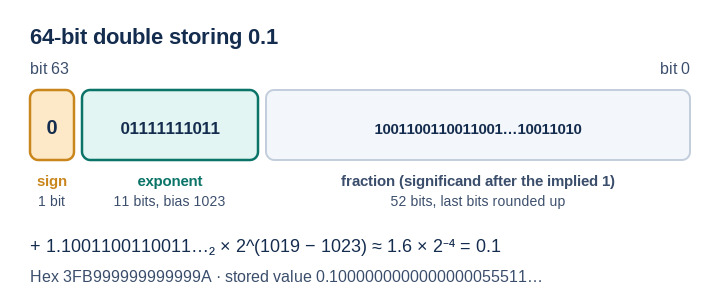
sign      0
exponent  01111111011               (1019 − 1023 = −4)
fraction  1001100110011001100110011001100110011001100110011010
hex 3FB999999999999AConverted back to decimal, the value actually stored for 0.1 is
Why 0.1 + 0.2 is not 0.3
The value 0.2 is also stored slightly high. When the two are added, the exact sum of the stored values is rounded to the nearest double, which is 0.3000000000000000444…. The double nearest to 0.3, however, is 0.2999999999999999888…. These are neighboring doubles, one step apart (hex 3FD3333333333334 and 3FD3333333333333), so 0.1 + 0.2 == 0.3 is false, and printing the sum with 17 significant digits shows 0.30000000000000004.
This happens in every language that uses double precision, including JavaScript, Python, Java, C, C++ and C#. It is not a bug in the language or the processor: it is the correctly rounded result of adding two numbers that were already approximations.
Machine epsilon: how accurate floating point is
The gap between 1 and the next larger double is called machine epsilon:
IEEE 754 requires the basic operations (addition, subtraction, multiplication, division and square root) to be correctly rounded: the result must be the exact answer rounded to the nearest representable number. Each single operation therefore has a relative error of at most ε/2, about 1.1 × 10⁻¹⁶. That is like measuring the distance from New York to Los Angeles to better than a nanometer.
Gaps between floating point numbers grow with their size. Between 1 and 2 the step is ; between 1024 and 2048 it is ; above it is 2, so odd integers can no longer be stored. The relative precision stays the same, about 16 significant digits, wherever the number is. The trouble is never one operation on its own. It is what later operations do with the small errors already present.
Special values: infinity, NaN, overflow and underflow
The largest and smallest exponent codes are reserved for values that are not ordinary numbers, so a calculation can keep going instead of crashing:
| Value | How it is stored | Example in double precision |
|---|---|---|
| Zero (±0) | Exponent and fraction all 0s; the sign bit gives +0 or −0 | −1e-200 × 1e-200 gives −0 |
| Subnormal numbers | Exponent all 0s, fraction not 0; no implied leading 1 | Values between and , with fewer significant digits |
| Infinity (±∞) | Exponent all 1s, fraction 0 | 1e308 × 10 gives Infinity; 1/0 gives Infinity in most languages |
| NaN (not a number) | Exponent all 1s, fraction not 0 | 0/0, ∞ − ∞ or the real square root of −1; NaN is not equal even to itself |
Overflow means a result is too large for the format and becomes infinity. Underflow means a result is too small: it first loses precision as a subnormal, then rounds to zero. Half of the smallest subnormal double, 5e-324 / 2, is 0. On a handheld calculator, “underflow” or a result of 0 for something like means the true answer is below the smallest number the calculator can show, not that it is exactly zero.
How calculators hide the noise
A calculator that showed all 17 digits would display rounding residue constantly. Instead, calculators carry more digits internally than they display, typically showing 10 to 12 significant digits. Rounded to 10 significant digits, 0.30000000000000004 is simply 0.3. Many handheld calculators also work in decimal internally, so 0.1 is exact on them in the first place.
The ScientifiCalc scientific calculator does both of these things and one more. Its default Norm format shows up to 10 significant digits, and in its default Exact when possible mode, decimals you type are read as exact fractions. 0.1 + 0.2 is computed as 1/10 + 2/10 = 3/10 exactly, so no floating-point error occurs at all. Double precision is used only when a result cannot stay rational, for example after the square root of a non-square, a logarithm or a trigonometric function. The methodology page lists the precision of each kind of result.
Catastrophic cancellation: when rounding errors grow
Subtracting two nearly equal numbers cancels their leading digits, which were correct, and leaves the trailing digits, which hold the rounding error. The relative error of the difference can be enormous even though each input was accurate to about 16 digits.
Example 1: an expression that collapses to zero
The expression approaches 1/2 as x approaches 0. Evaluate it in double precision at and the result is 0. The true value of is , which lies less than half a step below 1 (doubles just below 1 are about apart), so the stored cosine is exactly 1 and the numerator becomes 0.
The cure is to rewrite the formula so that no close numbers are subtracted. With the identity ,
and the right-hand form evaluates to 0.5 at , correct to full precision.
Example 2: the quadratic formula
Take , whose small root is extremely close to . The textbook formula subtracts two numbers, and , that differ by only about 2 parts in , and in double precision it returns about , roughly 25% wrong. The algebraically equivalent form
adds the two large numbers instead of subtracting them and gives , correct to every digit shown. Numerical software uses rearrangements like this one routinely.
Other floating point rounding errors you will meet
- Repeated addition. Adding 0.1 to a running total ten times gives 0.9999999999999999, not 1, because each addition rounds.
- Order of operations. Floating point addition is not associative: (0.1 + 0.2) + 0.3 gives 0.6000000000000001, while 0.1 + (0.2 + 0.3) gives 0.6. Summing the same list in a different order can change the last digits.
- Equality tests. A program that checks whether a computed value equals 0.3 may fail. Compare with a tolerance instead, such as |x − 0.3| < 10⁻⁹, or a tolerance scaled to the size of x.
- Large integers. Doubles represent every integer exactly only up to 2⁵³ = 9,007,199,254,740,992. Beyond that, gaps appear: 2⁵³ + 1 cannot be stored and rounds to 2⁵³. ScientifiCalc keeps integer results exact with arbitrary-precision arithmetic, so
30!is shown in full as 265252859812191058636308480000000. - Money. Amounts such as 0.10 cannot be stored exactly in binary, so financial software usually counts in whole cents or uses decimal arithmetic. When you convert currency, round only the final amount to the smallest unit: whole cents for US dollars to euros, whole yen for US dollars to Japanese yen.
# Python
import math
from decimal import Decimal
0.1 + 0.2 == 0.3                                  # False
math.isclose(0.1 + 0.2, 0.3)                      # True (relative tolerance 1e-9)
Decimal('0.1') + Decimal('0.2') == Decimal('0.3')  # True (decimal arithmetic)

// JavaScript
Math.abs(0.1 + 0.2 - 0.3) < Number.EPSILON // trueFloating point vs integers vs decimal types
| Type | Stores | Exact for | Use it for |
|---|---|---|---|
| Integer (int) | Whole numbers only | Every whole number in its range | Counts, indexes, money in whole cents |
| Binary floating point (float, double) | Sign, binary significand, exponent | Fractions with a power-of-2 denominator, such as 0.5 or 6.25 | Science, engineering, graphics, statistics |
| Decimal type (Python decimal, Java BigDecimal, C# decimal) | Decimal digits and a scale | Decimal fractions such as 0.1 and 19.99 | Prices, accounting, tax |
| Exact fraction (rational) | Integer numerator and denominator | Every fraction, including 1/3 | Algebra, and exact calculator answers |
In code, 2 is usually an integer and 2.0 a float, even though they are the same number. Both are stored exactly; the type only decides which rules later arithmetic follows.
When floating point error matters, and when it does not
For everyday calculations, floating-point error is far smaller than every other source of error. A length measured to the nearest millimeter over 10 m has a relative uncertainty of 10⁻⁴, about a trillion times larger than double-precision rounding. It does matter when:
- you subtract nearly equal quantities, as in differences of large numbers, numerical derivatives with very small steps, or the variance shortcut ;
- you repeat an operation millions of times and the errors accumulate;
- you test computed numbers for exact equality;
- you need exact integers above 2⁵³ or exact decimal amounts.
In those cases, rearrange the formula, switch to exact arithmetic with fractions or integers, or compare with a tolerance. When the issue is simply how many digits to report, the significant figures calculator rounds a result to the precision your data supports, and exact vs decimal answers explains when to keep a result as a fraction.
Practice questions
Is 0.375 stored exactly as a double?
Yes. 0.375 = 3/8, and 8 is a power of 2, so in binary it is 0.011₂, which ends.
Is 0.7 stored exactly?
No. 0.7 = 7/10, and the factor 5 in 10 makes the binary expansion repeat, so it is rounded.
What is the biased exponent of 1.0 in double precision?
1.0 = 1.0 × 2⁰, so the stored exponent is 0 + 1023 = 1023, or 01111111111₂. The full double is
3FF0000000000000.Can a double store 9,007,199,254,740,993 exactly?
No. That is 2⁵³ + 1, and above 2⁵³ doubles are 2 apart, so it rounds to 9,007,199,254,740,992.
About how many significant digits does a 32-bit float keep?
About 7. It has 24 significant bits, and . This is why
float0.1 prints as 0.100000001 at 9 digits.